Employee Retention Software: How to Choose Staff and Talent Retention Tools
Nobody really buys "employee retention software." What you are deciding is which one of about six very different kinds of tool closes the specific gap you have right now, and whether you need a full platform or a single tool that does one job well. Get that decision right and the shortlist writes itself. Get it wrong and you spend a year's budget on a product that measures something you already understood. This guide is vendor-neutral: the categories, what each is genuinely good at, how to tell similar-looking products apart, and what to ask before you sign.
Match tools to the gap you actually have, not the longest feature list.
Start with the decision, not the demo
Before you look at a single product, write down one sentence: the retention problem you would most like solved this quarter. Almost every honest answer falls into one of four shapes.
- "We don't really know how people feel." You are guessing at morale, or relying on what managers happen to hear. Your gap is measurement.
- "We hear the problems but nothing changes." Feedback arrives and then stalls. Your gap is acting on it: structure, cadence, follow-through.
- "We find out too late." Resignations land as a surprise, usually from the people you would least want to lose. Your gap is lead time.
- "People don't feel valued." Good work goes unremarked and strong performers quietly conclude it does not matter. Your gap is recognition.
Each of those points at a different category, and the categories are not substitutes for one another. This is the most common buying mistake in this market: a team that finds out about resignations too late buys an engagement survey platform, runs it for a year, and still finds out about resignations too late.
Software also has a hard ceiling worth naming up front. No tool retains anyone. Retention happens in conversations: stay interviews, fair pay, real growth, follow-through. Software's job is to make those conversations happen earlier and more often, which is why our guide to employee retention strategies that actually work is the natural companion to this one.
Employee, staff, or talent retention software: does the label mean anything?
You will see the same products sold as employee retention software, staff retention software, talent retention software, retention tools, or an employee retention platform. In substance these are the same category. What differs is the buyer being addressed: vendors selling into operations, retail, healthcare, and frontline teams tend to say staff; vendors selling to HR leaders and executives tend to say talent; employee is the neutral middle. Nothing about the underlying software changes with the label.
The distinction that does matter is scope. A point tool does one job well: a survey app, a one-on-one tracker, an early-warning signal. It is quick to adopt, cheap to pilot, and easy to drop if it does not earn its keep. An employee retention platform bundles several of those jobs behind one login and one contract. It cuts the number of vendors you manage and keeps people data in one place, but it typically means a longer commitment and a real rollout with configuration, training, and admin time.
Vendor demos lean on the same shorthand as well: eNPS, pulse survey, flight risk, regretted attrition. Our glossary of HR and retention terms defines them, so you can tell a real capability from a repackaged label.
Neither is automatically right. Match the shape to the gap: narrow gap, point tool; consolidating three overlapping tools you already pay for, platform. And a retention platform is really just several of the categories below sold together, so the category breakdown still applies when you evaluate one.
The six categories of retention software
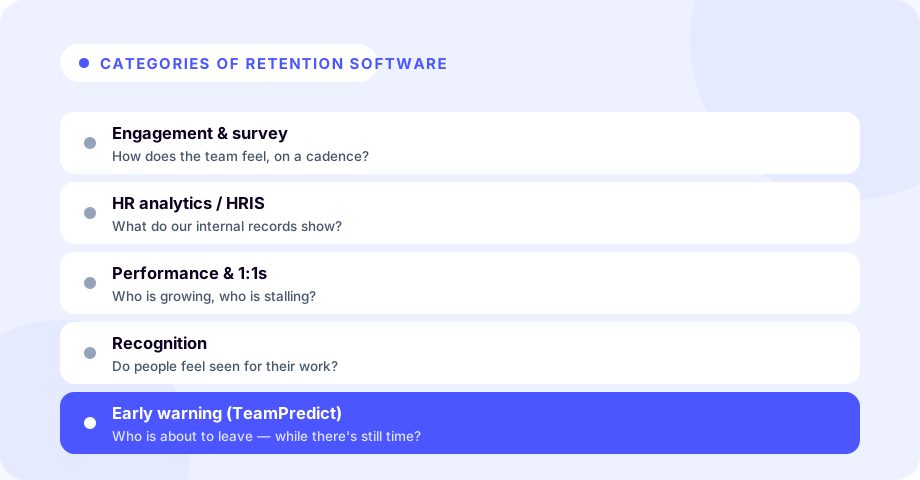
There is no single best retention tool, because these products answer different questions. Here is what each category is for, and where each one runs out of road.
Engagement and survey platforms
What they do: Collect employee sentiment through engagement surveys, pulse checks, and eNPS, then roll it up into scores and trends by team, manager, or location.
Use them when: You want to understand how people feel in aggregate and track whether the environment is improving. They are strong at surfacing themes ("managers in this region score low on recognition") and at giving leadership a defensible read on morale.
Where they run out: Surveys are periodic and anonymous by design, so they describe groups, not individuals. A team can look fine on a quarterly survey while your most critical engineer is quietly interviewing.
Core HR systems (HRIS)
What they do: Serve as the system of record for employee data: roles, tenure, compensation, manager, location, and turnover history.
Use them when: You need clean, structured people data. An HRIS is the foundation everything else draws on, and it is where you calculate your baseline. If you are not tracking that yet, start with how to calculate employee turnover rate.
Where they run out: An HRIS records what happened; it rarely predicts what is coming. Essential infrastructure, but a backward-looking ledger rather than an early-warning system.
Performance and one-on-one tools
What they do: Structure goals, reviews, feedback, and recurring one-on-one conversations between managers and reports.
Use them when: You want retention work to happen consistently. A reliable one-on-one cadence is one of the strongest retention levers there is, and these tools make it harder for important conversations to quietly lapse.
Where they run out: Everything they know is self-reported. The tool can prompt a one-on-one but cannot make it a good one, and someone who has already decided to leave often keeps their check-ins green until the resignation call.
Recognition and rewards platforms
What they do: Enable peer-to-peer recognition, rewards, and sometimes lightweight perks or service awards.
Use them when: Feeling unseen is a real driver of turnover on your team. Consistent, specific recognition is cheap relative to a backfill, and these tools make appreciation visible and habitual.
Where they run out: Recognition cannot compensate for structural problems such as unfair pay, no growth path, or a poor manager. Treat it as one ingredient, not a cure.
People-analytics and attrition-prediction suites
What they do: Combine internal data sources (HRIS, engagement, performance) to model attrition risk and produce dashboards and forecasts, usually aimed at an HR analytics team.
Use them when: You are a larger organization with the data maturity and the headcount to act on population-level forecasts, for example "turnover in this function is likely to rise next quarter."
Where they run out: Built around internal data, so they tend to lag the moment someone starts looking elsewhere, and they can be heavy to implement. For the prediction problem specifically, see how to predict employee turnover before it happens.
Early-warning and flight-risk tools
What they do: Answer the individual question, who is most likely to leave soon, and give managers lead time to respond, rather than rolling sentiment up into aggregate scores.
Use them when: Your biggest pain is being surprised by the departures you would least want. This is the category TeamPredict sits in, covered in detail below.
Where they run out: They tell you where to look, not why. Pair them with the conversation itself and with your engagement and HRIS data, which answer questions an early-warning signal cannot.
| Category | Question it answers | Example signals |
|---|---|---|
| Engagement & survey platforms | How does the team feel in aggregate? | eNPS, pulse checks, engagement scores and trends by team or manager |
| Core HR systems (HRIS) | What is true about our people right now? | Roles, tenure, compensation, manager, location, turnover history |
| Performance & one-on-one tools | Is retention work happening consistently? | Goals, reviews, feedback, one-on-one cadence |
| Recognition & rewards platforms | Do people feel seen for their work? | Peer-to-peer recognition, rewards, service awards |
| People-analytics & attrition-prediction suites | Where is turnover risk trending? | Modeled attrition risk, dashboards, population-level forecasts |
| Early-warning & flight-risk tools | Who is most likely to leave soon? | Public LinkedIn profile changes, a per-person resignation-risk level |
How to choose employee retention software: a seven-step checklist
Once you know the category, choosing well is mostly discipline. Work through these in order.
-
Name the problem first. Use the four shapes above: measuring, acting, predicting, or rewarding. Each points at a different category, and picking the wrong category cannot be fixed by picking a better vendor inside it.
-
Check the fit with the stack you already run. You almost certainly have an HRIS. Favor tools that complement it rather than duplicate it, and confirm that any integration you plan to depend on genuinely exists today, not on a roadmap.
-
Weigh time-to-value honestly. Some tools produce something useful in days, others need months of configuration and data plumbing first. Ask how long until the first real output, and be realistic about how much implementation your team can absorb this quarter.
-
Interrogate the data source and the ethics. This matters most for anything that scores individuals. Prefer tools that use transparent, defensible data and frame their output as a prompt for a supportive conversation rather than as monitoring of your people. If a vendor cannot explain in plain language where its signals come from, walk away.
-
Plan for manager adoption. The best tool is the one managers actually open. Simple products that surface one clear next step usually beat powerful dashboards nobody logs into.
-
Model total cost at your real headcount. Look past the sticker price to setup fees, required tiers, minimum spends, add-on modules, and per-seat pricing at the number of people you will actually cover.
-
Pilot before you commit. Run 30 to 60 days on one real team. The only proof that counts is whether it changed a decision or surfaced something you would otherwise have missed.
You do not need every category. A small company can do well with a simple survey, a one-on-one template, and an early-warning signal on its key people. Match the toolset to your size and your specific gap.
What to ask every vendor
Take these into the demo and write the answers down. They separate products faster than any feature grid.
- What decision does this change, and who makes it? If nobody can name the decision, the tool is a dashboard.
- Where does the data come from? Self-reported surveys, internal HR records, or external signals. This determines what the tool can and cannot see.
- How long until it produces something useful? Days, or a configuration project.
- What does it cost at exactly our headcount? Including setup fees, minimum annual spend, and every module you would actually need.
- What is the contract length, and is there a self-serve trial? Annual-only with no trial means you commit before you learn anything.
- If it scores individuals, explain the inputs in plain English. And explain what a manager is meant to do with a high score.
- What happens to our data if we leave? Ask about export format and data retention after cancellation.
How to tell similar-looking tools apart
Most vendors in this market describe themselves in nearly identical language, so use tests rather than claims.
Test one: what happens if participation drops? Survey-based and check-in-based tools are only as good as the response rate, and the people you are most worried about are often the first to stop answering candidly. Ask what the product tells you when someone disengages from the tool itself.
Test two: individual or aggregate? Anonymous, aggregate insight is a deliberate design choice in engagement platforms rather than a shortcoming, but it means the tool will tell you a team is at risk and never which person. If your gap is lead time on a specific person, aggregate tools cannot close it however good they are.
Test three: is pricing on the page? Some vendors publish rates, some quote only through sales, and several carry annual agreements with four-figure minimum spends that rule out small teams. Our comparison pages and the Lattice alternatives breakdown list the rates and contract terms taken from each vendor's own pricing page, checked on July 21, 2026, with the date shown on every entry. Whether pricing is public is not a measure of quality, and it is a reliable predictor of how long your buying cycle will be.
Test four: does it need your data before it works? Tools that require an HRIS integration or a survey history are answering a different question from tools that work on day one. Neither is better in the abstract; they suit different levels of urgency.
Where early-warning and flight-risk tools fit
Five of the six categories look inward, at survey responses, performance records, and HRIS data. That is valuable and it has a structural blind spot: by the time disengagement is clear in your internal systems, the person has often already started looking. The earliest honest sign that someone is exploring the market usually appears outside your walls.
This is the gap early-warning tools are built to close, and it is where TeamPredict sits. TeamPredict reads publicly available LinkedIn profile activity and summarizes it into a simple resignation-risk level for each tracked employee. Instead of an anonymous aggregate score, a manager gets a person-level read on who may be at risk, and the lead time to do something about it.
That lead time is the whole point. When you know early you have options: a candid stay interview, a growth opportunity, a workload fix, or, if a departure really is coming, time to groom a successor and plan a clean handoff instead of scrambling.
Three honest notes on this category:
- Early-warning signals sit alongside your engagement and HRIS data. Each answers a question the other cannot.
- A high risk level is an invitation to a supportive conversation, never proof that someone is leaving or grounds to treat them differently. For the manager-side playbook, see employee flight risk: how to identify and reduce it and the common signs an employee is about to quit.
- Insist on knowing exactly where any risk signal comes from. TeamPredict's comes from public professional activity, framed around retaining people rather than monitoring them.
TeamPredict is priced per tracked employee per month and includes a free trial, with the current rates published in full on our pricing page. That makes it straightforward to pilot on a single team the way step seven of the checklist recommends.
Putting it together
No single piece of employee retention software solves turnover, because turnover is not a single problem. Engagement platforms tell you how people feel, your HRIS holds the facts, performance and recognition tools structure the daily work, analytics suites forecast trends, and early-warning tools tell you who needs attention now. The right answer is usually a small, deliberate combination, chosen by starting from your biggest gap and resisting the urge to over-buy.
If your gap is finding out about resignations too late, the fastest way to test a fix is on the people you would least want to lose. Start a free TeamPredict trial and see your team's resignation-risk signals in one place. It takes minutes to set up and there is no charge until the trial ends; cancel anytime before then and pay nothing.
Software is one piece of the puzzle; see how it fits into a complete employee retention strategy.
Frequently asked questions
- What is employee retention software?
- Employee retention software is any tool that helps you keep people by measuring, predicting, or improving what makes them stay or leave. It is not one product. In practice it covers six categories: engagement and survey platforms, core HR systems (HRIS), performance and one-on-one tools, recognition and rewards platforms, people-analytics and attrition-prediction suites, and early-warning flight-risk tools. Most teams end up using two or three of these together rather than one product that does everything.
- How do I choose employee retention software?
- Start from the gap, not the product. Write down the single retention problem you would most like solved this quarter, then work out which of the six categories actually answers it. Buying an engagement platform will not help if your real problem is finding out about resignations too late. From there, compare shortlisted tools on five things: time-to-value, fit with the HR systems you already run, where the data comes from and how it is handled, whether managers will realistically use it, and total cost at your real headcount. Then pilot the top choice on one team for 30 to 60 days before you commit.
- Is there a difference between staff retention software and talent retention software?
- Not in substance. Staff retention software, talent retention software, and employee retention software are the same category described with different vocabulary. Vendors selling to operations and frontline teams tend to say staff, vendors selling to HR and executive buyers tend to say talent, and search traffic splits across all three. What varies is the buyer being addressed, not the underlying product, so compare tools on the six categories below rather than on the label a vendor picked.
- What should I ask a retention software vendor before buying?
- Ask what specific decision the tool changes and who makes it. Then get concrete: where does the data come from, how long until it produces something useful, what does it cost at our exact headcount including setup fees and minimum spends, what is the contract length, is there a self-serve trial, and what happens to our data if we leave. For anything that scores individuals, ask the vendor to explain the inputs in plain language. If they cannot, that is your answer.
- What is the difference between an employee retention platform and a point tool?
- Scope. An employee retention platform bundles several jobs (surveys, reviews, goals, recognition) behind one login and one contract. A point tool does one job well: a survey app, a one-on-one tracker, an early-warning signal. Platforms reduce vendor count and keep people data in one place, but they usually carry longer contracts and a real rollout. Point tools are faster to adopt, cheaper to pilot, and easier to drop. If your gap is narrow, a point tool normally wins. If you are consolidating three overlapping tools, a platform may earn the heavier commitment.
About TeamPredict
TeamPredict Team
We build TeamPredict - retention early-warning software that flags resignation risk from public LinkedIn signals. We write about the patterns that precede a resignation and how people-first teams act on them early. Learn more about TeamPredict
Comparing retention tools?
See TeamPredict next to Lattice, Culture Amp, 15Five and others on the same criteria, with their pricing verified from their own pages.
See all comparisonsFree, no signup required.